Landscaping contractor software for estimates & invoices
Estimating and invoicing software for landscaping contractors in the United States. Put your prices into itemized proposals for planting, hardscape and installs, collect online signatures, schedule jobs and track crew hours.
No credit card required.
Quick answer
Landscaping contractors use Estiggle to keep each project together: the client and job address, an itemized proposal for the design and install work, an online signature, the schedule and crew hours, and an invoice that shows the deposit, payments and the balance due. Appointments can repeat daily, weekly or every two weeks. It works from a phone or a computer; route optimization is not included.
Key points
- Write the proposal with site prep, hardscape, planting and cleanup as separate categories.
- Add photos to an item to record the yard as it was before the work, up to four per item.
- The client signs from a link in their browser, with no account.
- Schedule a single appointment or a series of 2–52 appointments, daily, weekly or every two weeks.
From the first visit to a paid invoice
Visit the property
Add the visit to the agenda, linked to the client. Take your own measurements and photos of the yard; the quantities and prices you enter later are yours.
Write the proposal
Add categories such as Site prep, Hardscape and Planting, then your saved services or your own items, each with a quantity, a unit and a price. Photos of the starting condition go on the item.
The proposal editor, with a live preview of what the client will read. Fictional example data. Send it and get it signed
Email the proposal. The client opens their own page, reads the work and the price, and signs online.
What the client sees: the proposal, the total and a form to sign. Fictional example data. Schedule the install and track the crew
Add the install days to the agenda, then mark attendance each day and see hours by worker and by job site.
The agenda in week view, with a mini calendar and Month, Week and Day views. Fictional example data. Bill the deposit, then the balance
Create the first invoice from the signed proposal for a deposit, record each payment, and bill the remaining balance when the project is finished.
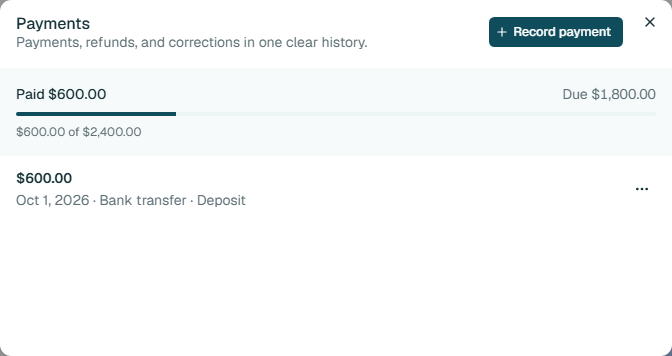
The payment history shows what has been paid and what is still due. Fictional example data.
What goes into a landscaping proposal
A landscaping project mixes materials, plants and labor, so the proposal should show what is included in each. These are examples of how the work is commonly grouped, not prices: you enter your own quantities and prices.
Site prep and demolition
- Remove existing sod, plants or paving
- Grade the area
- Haul away debris
Hardscape
- Install a patio or walkway
- Build a retaining wall
- Install edging
Planting
- Supply and plant trees and shrubs
- Lay sod or seed
- Spread mulch
Irrigation
- Install or adjust sprinkler zones
- Connect the controller
Cleanup
- Clean up the site
- Walk through with the client
Settle these before you quote
Outdoor jobs depend on the ground, the weather and the season. The proposal should say how each is handled.
Put the answers in the proposal
- Where the equipment and material deliveries can get in, and who protects the driveway and lawn.
- That underground utilities are located before any digging; in the United States, call 811 first.
- The condition of the soil and drainage, with photos, so there is a record of how the yard started.
- Who waters new plants and sod, and what replacement terms apply if a plant does not survive.
- The planting season and what happens to the schedule if the weather delays the work.
- The deposit, and whether the rest is paid when materials arrive or as each stage is finished.
What you get in the workspace
- Saved services
- Save the work you quote most, such as a paver patio or a planting bed, with a description, a unit and a price, and add it to a proposal in a click. It is copied in, so you can still edit it.
- Photos on items
- Add photos to a proposal item to record the yard as it was before the work, up to four per item.
- You choose the price detail
- Show the client just the total, a total per category, or a price on every row. A live example shows what they will see.
- Signed online
- The client opens a link, confirms their name, types, draws or uploads a signature and accepts. You see the status, and the signed PDF is kept.
- Addresses that stay accurate
- Save a client’s addresses once. A proposal or invoice keeps the address as it was when the document was created, so later edits do not change old paperwork.
- Crew hours by job site
- Mark who worked each day, split hours across job sites, and see hours and estimated pay for any date range. Estiggle is not payroll.
- An agenda for visits and jobs
- Plan site visits and work days by month, week or day, link them to clients, and optionally connect Google Calendar.
- Invoices with a clear balance
- Create the invoice from the signed proposal, bill a deposit, a stage or the remaining balance, record each payment, and see what is paid and what is due.
Other kinds of work
The workspace is the same for every contractor. Each page shows how a different kind of job is written up.
- SoftwareContractor management softwareEverything the workspace covers, and what it does not do.
- SoftwareEstiggle for painting contractorsHow a painting job moves from walkthrough to proposal, schedule and invoice.
- SoftwareEstiggle for carpentry contractorsHow a carpentry job moves from site visit to proposal, schedule and invoice.
- SoftwareEstiggle for roofing contractorsHow a roofing job moves from inspection to proposal, install schedule and invoice.
- SoftwareEstiggle for remodeling and general contractorsHow a remodel moves from walkthrough to a signed proposal, a schedule and stage invoices.
Start with
21 days free.
Clients, proposals, invoices, scheduling, and crew management. Included with either billing option.
Start your 21-day free trialNo credit card required.
Choose how you pay.
- MonthlyBilled monthly
- $12/ month
- AnnualBilled annually
- $100/ year
Prices in USD. Annual billing saves $44 per year.
Questions
Does Estiggle work for landscaping contractors?
Yes. Estiggle is management software for independent contractors, including landscapers who quote design and install jobs. You put your own quantities and prices into itemized proposals, and the rest of the job runs from the same client record.
Can I schedule weekly lawn visits that repeat?
Yes. Create appointments that repeat daily, weekly or every two weeks, with 2–52 occurrences including the first. You can edit one appointment or that appointment and the following ones. Estiggle does not optimize routes or automatically create recurring invoices.
Does Estiggle work out area, volume or plant counts?
No. There are no automatic takeoffs or cost database in Estiggle. You enter your own quantities and prices, so the proposal always shows your numbers. See what Estiggle covers.
Can I bill a deposit before I order materials?
Yes. From a signed proposal you can create an invoice for a deposit, for a stage of the work, or for the remaining balance, and the invoices together cannot exceed the proposal amount.
Can clients sign on their phone?
The client opens the link in a browser, on a phone or a computer, confirms their name, adds a signature and accepts. They do not need an account.