Remodeling contractor software for estimates & invoices
Estimating and invoicing software for remodeling and general contractors in the United States. Put your prices into proposals with a category for each part of the job, collect online signatures, schedule the work and bill in stages.
No credit card required.
Quick answer
Remodelers and general contractors use Estiggle to keep a long job organized: the client and job address, an itemized proposal with a category for each part of the work, an online signature, the schedule and crew hours, and invoices for the deposit, each stage and the final balance. It works from a phone or a computer.
Key points
- Give each part of the job its own category, and choose how much price detail the client sees.
- The client signs from a link in their browser, with no account.
- Bill a deposit, then a stage at a time, then the remaining balance; together they cannot exceed the proposal.
- If the scope changes after approval, the client approves the updated proposal.
From the first visit to a paid invoice
Walk the job
Add the walkthrough to the agenda, linked to the client. Take your own measurements and photos; the quantities and prices you enter later are yours.
Write the proposal
Add a category for each part of the job, such as Demolition, Electrical and Cabinets, then your saved services or your own items, each with a quantity, a unit and a price.
The proposal editor, with a live preview of what the client will read. Fictional example data. Send it and get it signed
Email the proposal. The client opens their own page, reads the scope and the price, and signs online.
What the client sees: the proposal, the total and a form to sign. Fictional example data. Schedule the work and track the crew
Add the work days to the agenda, then mark attendance each day and see hours by worker and by job site.
The agenda in week view, with a mini calendar and Month, Week and Day views. Fictional example data. Bill in stages
Create an invoice from the signed proposal for the deposit, another when each stage is done, and a last one for the remaining balance. Record each payment as it arrives.
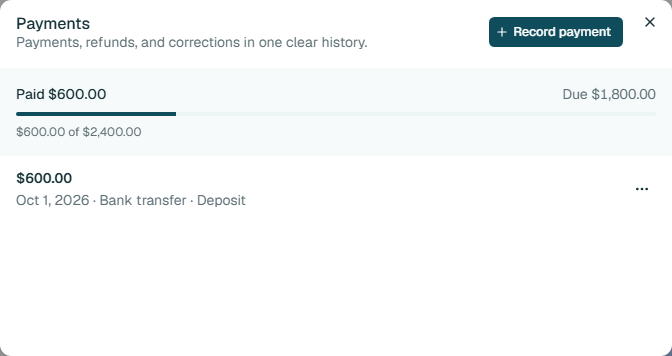
The payment history shows what has been paid and what is still due. Fictional example data.
What goes into a remodeling proposal
A remodel touches many kinds of work, so the proposal is where the scope is divided up. These are examples of how the work is commonly grouped, not prices: you enter your own quantities and prices.
Demolition and protection
- Demolish the existing finishes
- Protect the rest of the home
- Haul away debris
Structural and framing
- Frame new walls or openings
- Install support where a wall is removed
Mechanical and electrical
- Rough-in and finish plumbing
- Rough-in and finish electrical
- Heating and cooling changes
Finishes
- Drywall and paint
- Flooring
- Tile
- Trim and doors
Cabinets and fixtures
- Install cabinets and countertops
- Install the plumbing and lighting fixtures
Final cleanup
- Clean the work area
- Walk through with the client
Settle these before you quote
A remodel runs for weeks in someone’s home. The proposal should answer the questions that come up in week three.
Put the answers in the proposal
- Which items are allowances, such as fixtures or tile, and what happens above the allowance.
- Which work is done by your crew and which by subcontractors.
- Who pulls the permits and who schedules the inspections.
- How added work is handled once the client has approved the proposal.
- The order of the work and the expected length of each stage.
- How the home is protected and how dust and noise are managed while the family lives there.
- The deposit, each stage payment and when the final balance is due.
What you get in the workspace
- Saved services
- Save the work you quote most, such as a bathroom demolition or a tile installation, with a description, a unit and a price, and add it to a proposal in a click. It is copied in, so you can still edit it.
- A category for every part of the job
- Group the proposal by the kind of work, so the client sees what each part of the remodel includes and what it costs.
- You choose the price detail
- Show the client just the total, a total per category, or a price on every row. A live example shows what they will see.
- Signed online
- The client opens a link, confirms their name, types, draws or uploads a signature and accepts. You see the status, and the signed PDF is kept.
- Addresses that stay accurate
- Save a client’s addresses once. A proposal or invoice keeps the address as it was when the document was created, so later edits do not change old paperwork.
- Crew hours by job site
- Mark who worked each day, split hours across job sites, and see hours and estimated pay for any date range. Estiggle is not payroll.
- An agenda for visits and jobs
- Plan site visits and work days by month, week or day, link them to clients, and optionally connect Google Calendar.
- Invoices for each stage
- Create invoices from the signed proposal for the deposit, each stage and the remaining balance, record every payment, and see what is paid and what is due.
Other kinds of work
The workspace is the same for every contractor. Each page shows how a different kind of job is written up.
- SoftwareContractor management softwareEverything the workspace covers, and what it does not do.
- SoftwareEstiggle for painting contractorsHow a painting job moves from walkthrough to proposal, schedule and invoice.
- SoftwareEstiggle for carpentry contractorsHow a carpentry job moves from site visit to proposal, schedule and invoice.
- SoftwareEstiggle for roofing contractorsHow a roofing job moves from inspection to proposal, install schedule and invoice.
- SoftwareEstiggle for landscaping contractorsHow a landscaping project moves from the site visit to proposal, install schedule and invoice.
Start with
21 days free.
Clients, proposals, invoices, scheduling, and crew management. Included with either billing option.
Start your 21-day free trialNo credit card required.
Choose how you pay.
- MonthlyBilled monthly
- $12/ month
- AnnualBilled annually
- $100/ year
Prices in USD. Annual billing saves $44 per year.
Questions
Does Estiggle work for remodeling and general contractors?
Yes. Estiggle is management software for independent contractors, including remodelers. Each part of the job can be its own category in one itemized proposal, and the rest of the job runs from the same client record.
What if the client adds work after approving the proposal?
Changing an approved proposal removes its approval, so the client signs the updated version. You can also write a separate proposal for the extra work. Estiggle does not have a separate change-order document.
Can I bill in stages as the work is finished?
Yes. From a signed proposal you can create an invoice for a deposit, for a stage of the work, or for the remaining balance, and the invoices together cannot exceed the proposal amount.
Does Estiggle manage subcontractors?
Estiggle tracks your own crew’s hours and estimated pay. It does not manage subcontractor bids, contracts or payments.
Can clients sign on their phone?
The client opens the link in a browser, on a phone or a computer, confirms their name, adds a signature and accepts. They do not need an account.